Included features
- Read plugin dependencies from supported DAW sessions.
- Distinguish installed, built-in, Waves shell, different-version and missing plugins.
- Inspect WAV files and export session reports without uploading the session.
Read a supported session locally, compare its plugin dependencies with this Mac and share a checklist before handoff.
Version 1.0.8 · macOS 13.0 or later · Apple Silicon only · 30-day trial
Scan what is there.


UTUVO Scan · US$19 · One app, one-time purchase. Other UTUVO apps are separate purchases.
| System requirements | macOS 13.0 or later · Apple Silicon only · Intel not supported |
|---|---|
| Licence | No subscription. Buy once, use the purchased major version and every update within that major. 3 of your own Macs. Terms |
| Move or reinstall | Open the app on the old Mac, go to Settings and deactivate the licence there, then enter the same key on the new Mac. No email needed, and a licence covers 3 of your own Macs. Deactivate while the old Mac still has a network connection: if it is offline at that moment the app clears the licence locally but the seat can stay held on our side, and support@utuvo.app can release it for you. For reinstallation, use the same key. If activation cannot be completed, contact support with your order details. |
| Trial | Download and open the app for a 30-day full-feature trial. No card or account required. No automatic charge. |
| Refunds and support | 14-calendar-day no-reason refund period. Refund policy · support@utuvo.app Include your order number for refunds, or app/macOS versions and reproduction steps for issues. |
| Updates | Read the update and maintenance policy ↗ |
A screen recording of UTUVO Scan running on a real file, from the first click to the result you keep.
Missing is a lazy answer. A plug-in may be installed, inside a Waves shell, or built into the DAW. Drop a session, or a WAV file, into UTUVO Scan. An easy session is three of three, ready to open. A harder one says five of six, one to install. Waves shell and Pro Tools built-in are not mislabeled as missing. Scan also catches the WAV file that would split into A1 and A2. It names the cause: an iXML chunk. Save a Pro Tools-friendly copy, or fix the batch. Originals stay untouched. Seven answers, not two.


Seven answers
Drop a supported session or a WAV into Scan. It separates exact bundle identity, installed, Waves shell, DAW built-in, name-matched, different version and missing instead of collapsing them into one guess.


A1 / A2
For the supported iXML case, Scan removes the iXML chunk while preserving audio, format and BEXT timecode. It writes a Pro Tools-friendly copy and leaves the original untouched.


Originals untouched
Review each supported WAV verdict, then write corrected copies beside the source. Scan does not claim to repair RF64 or every audio file automatically.
| Product Demo inputs | Pro Tools, Cubase, Nuendo, REAPER, Logic, Digital Performer, LUNA and WAV |
|---|---|
| A1 / A2 case | iXML chunk check with a cleaned stereo copy |
| Boundary | The report is a checklist, not a guarantee that a session will open |
Precision is part of the product.


Drop a session, read the result bar, copy the missing plugins as plain text, hand the material question to UTUVO Prep, scan another. The tour runs on first launch and again from the ? button or Help → Replay Tutorial.
| Version | 1.0.8 |
|---|---|
| Requirements | macOS 13.0 or later · Apple Silicon only |
| Size | 13,410,257 bytes |
| SHA-256 | a1b566214e69ef2ce6ec5ecc707f439a0e4d7f49aab634acdb2612e1ee6cec54 |
| Signing | Developer ID signed · Apple notarized |
| Trial | 30 days, then a licence key |
A comparison of manual, separate steps and this tool’s workflow. Other tools can also do these jobs.
| Without UTUVO | With UTUVO |
|---|---|
| Open a supported session in its DAW to inspect dependencies. | Read supported session files without opening the DAW. |
| Compare plugin names against the Mac by hand. | Compare session dependencies with the local plugin inventory. |
| Compare similar plugin names manually. | Keep name matches that need confirmation separate. |
| Write the missing-plugin list into a new document. | Copy the missing list or share the HTML report. |
| Check each WAV to investigate A1A2 channel labels. | Inspect WAVs and use the supported A1A2 repair workflow. |
No. Scan writes a Pro Tools-friendly or batch copy and keeps the original untouched.
No. Scan separates installed, Waves shell, DAW built-in, name-matched, different version and truly missing cases.
No. The A1 / A2 workflow is for the supported iXML case. RF64 and automatic repair of every file are outside this page.
Download and open the app to evaluate all features for 30 days. No credit card or account is required. The trial does not turn into an automatic charge; purchasing is a separate decision.
It includes the major version you purchase and every update released within that major version. A future major version may be a separate optional one-time purchase or may be free. It is never charged automatically. If you buy within 30 calendar days before a new major becomes available, that new major is included at no charge.
Open the app on the old Mac, go to Settings and deactivate the licence there, then enter the same key on the new Mac. No email needed, and a licence covers 3 of your own Macs. Deactivate while the old Mac still has a network connection: if it is offline at that moment the app clears the licence locally but the seat can stay held on our side, and support@utuvo.app can release it for you.
The current download requires macOS 13.0 or later · Apple Silicon only. Apple Silicon only; no Intel or Windows build. Try it on your working Mac before deciding to buy.
The 30-day full-feature trial is for evaluation before purchase. The 14-calendar-day no-reason refund period begins separately on the purchase date, so trial days do not reduce it. After 14 days, a simple change of mind is generally not refundable, while transaction errors, activation failure, nonconformity and statutory remedies remain covered.
Email support@utuvo.app. Within 14 days of purchase you can request a full refund without giving a reason; include your order number or licence key, or use the link in your order confirmation email. For a product issue, include the app version, macOS version and steps to reproduce it.
No. After a paid licence is successfully activated, it continues to work offline on that device. A network or verification-service failure alone cannot deactivate it. If the verification service permanently ends, we will provide a free way for lawful perpetual-licence holders to continue using, reinstalling and activating on a replacement compatible Mac within their device count.
UTUVO Work Series
Five independent tools for five different jobs around a session.
 UTUVO ScanMissing is a lazy answer.Available for macOS
 UTUVO PrepNames and heads. Two decisions, then it is done.Available for macOS
 UTUVO QCEvery known rejection reason, caught before you upload.Available for macOS
 UTUVO ManagerKnow your plugin rig before the session finds the problem.Available for macOS
 UTUVO CatalogA library that respects the masters.Invitation-only beta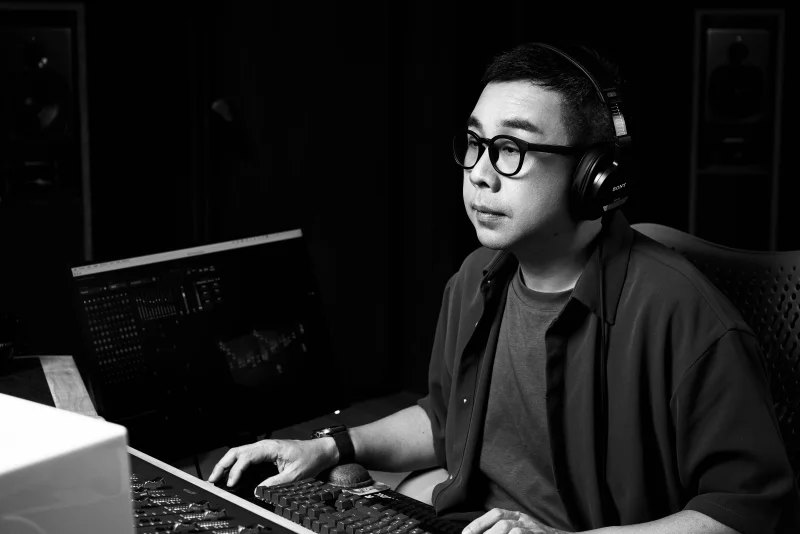
UTUVO is built by one person: Micky Yang.
He's a Tonmeister with 1,600+ Mandopop songs mixed in Dolby Atmos, four Golden Melody Awards for recording, and he teaches recording at university. Most tools are what engineers imagine recordists need. UTUVO is what a recordist built because he couldn't stand the existing ones.